Blazor is a fully featured web UI framework designed to handle the needs of most modern web apps. But whether Blazor is the right framework for you depends on many factors.
You should consider using Blazor for web development if:
You’re looking for a highly productive full stack web development solution.
You need to deliver web experiences quickly without the need for a separate frontend development team.
You’re already using .NET, and you want to apply your existing .NET skills and resources on the web.
You need a high-performance and highly scalable backend to power your web app.
Blazor might not be a good fit if:
You need to fully optimize download size and load time of client-side assets.
You need to integrate heavily with a different frontend framework ecosystem.
You need to support older web browsers that don’t support the modern web platform.
Blazor provides many features to help you get started and deliver your next web app project fast. Let’s take a tour of the core capabilities of Blazor to help you decide whether you should use Blazor for your next great web app.
Blazor components
Blazor apps are built from components. A Blazor component is a reusable piece of web UI. A Blazor component encapsulates both its rendering and UI event handling logic. Blazor includes various built-in components for form handling, user input validation, displaying large data sets, authentication, and authorization. Developers can also build and share their own custom components, and many prebuilt Blazor components are available from the Blazor ecosystem.
Use standard web technologies
You author Blazor components using Razor syntax, a convenient mixture of HTML, CSS, and C#. A Razor file contains plain HTML and then C# to define any rendering logic, like for conditionals, control flow, and expression evaluation. Razor files are then compiled into C# classes that encapsulate the component’s rendering logic. Because Blazor components authored in Razor are just C# classes, you can call arbitrary .NET code from your components.
UI event handling and data binding
Interactive Blazor components can handle standard web UI interactions using C# event handlers. Components can update their state in response to UI events and adjust their rendering accordingly. Blazor also includes support for two-way data binding to UI elements as a way to keep component state in sync with UI elements.
The following example is a simple Blazor counter component implemented in Razor. Most of the content is HTML, while the @code block contains C#. Every time the button is pressed the IncrementCount C# method is invoked, which increments the currentCount field, and then the component renders the updated value:
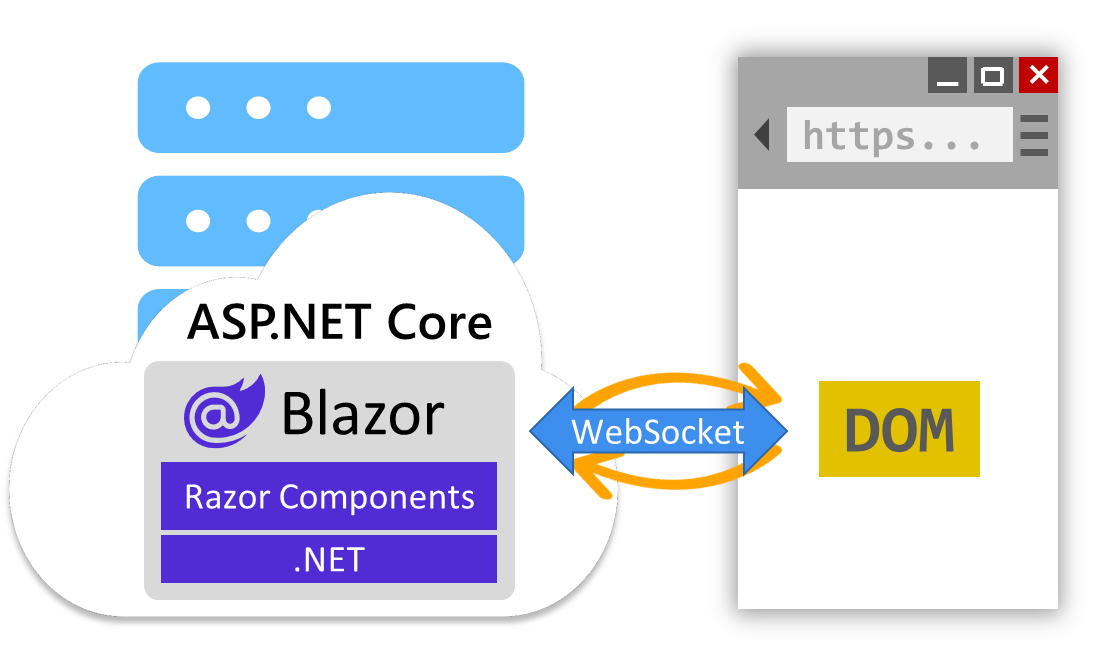
Blazor supports both server and client-side rendering of components to handle various web UI architectures. Components rendered from the server can access server resources, like databases and backend services. By default, Blazor components are rendered statically from the server, generating HTML in response to requests.
You can also configure server components to be interactive, so they can handle arbitrary UI events, maintain state across interactions, and render updates dynamically. Interactive server components handle UI interactions and updates over a WebSocket connection with the browser.
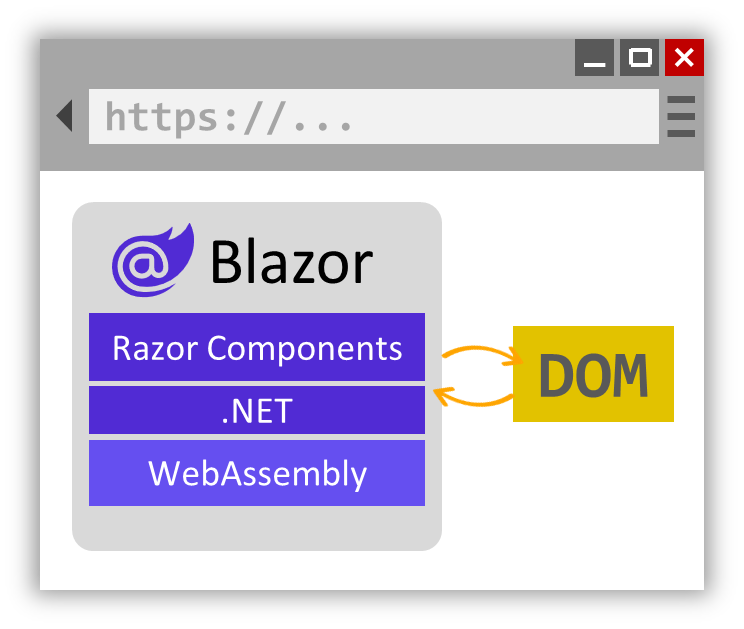
Alternatively, Blazor components can be rendered interactively from the client. The component is downloaded to the client and run from the browser via WebAssembly. Interactive WebAssembly components can access client resources through the web platform, like local storage and hardware, and can even function offline once downloaded.
You can choose to render different components from the server or the client within the same app. Many of the pages in your app might not require any interactivity at all, and can be rendered statically from the server. While other more interactive parts of your app can be handled from the server or client. You can decide which component render mode to use at design time or runtime. With Blazor, you have the flexibility to build the web app architecture that’s right for your scenario.
Using Blazor to build a pizza shop
The UI of the pizza shop app breaks down into many reusable components: a page layout with a navbar, individual pages, a pizza catalog and editor, an order component, and so on. Blazor provides built-in support for many of these components, like components for forms and validation. Many of the pages in the app can be handled from the server using static server-side rendering so that the site is mostly stateless and ready to scale. Where more interactivity is needed, the components are made interactive by applying an interactive render mode. To offload work from the server, interactive components are rendered on the client via WebAssembly. By building the entire app with a single web development stack, the app comes together quickly and soon the pizza orders are flowing in.
Blazor is a modern frontend web framework based on HTML, CSS, and C# that helps you build web apps faster. With Blazor, you build web apps using reusable components that can be run from both the client and the server so that you can deliver great web experiences. Blazor is part of .NET, a developer platform for building anything. .NET is free, open-source, and runs cross-platform.
Some of the benefits of using Blazor include:
Build web UI fast with reusable components: Blazor’s flexible component model makes it easy to build reusable components that you can use to assemble apps quickly.
Add rich interactivity in C#: Handle arbitrary UI events from the browser and implement component logic all in C#, a modern type-safe language that is easy to learn and highly versatile.
One development stack: Build your entire web app from the frontend to the backend using a single development stack and share code for common logic on the client and server.
Efficient diff-based rendering: As components render, Blazor carefully tracks what parts of the DOM changed, so that UI updates are fast and efficient.
Server and client-side rendering: Render components from both the server and the client to implement various web app architectures and deliver the best possible web app experience.
Progressively enhanced server rendering: Use built-in support for enhanced navigation & form handling and streaming rendering to progressively enhance the user experience of server rendered web apps.
Interop with JavaScript: Use the ecosystem of JavaScript libraries and browser APIs from your C# code.
Integrate with existing apps: Integrate Blazor components with an existing MVC, Razor Pages, or JavaScript based apps.
Great tooling: Use Visual Studio or Visual Studio Code to get started in seconds and stay productive with great code editing support.
Web, mobile, and desktop: Blazor components can also be used to build native mobile & desktop apps using a hybrid of native and web, called Blazor Hybrid.
Building web apps can be a complex effort. Choosing the right web framework for your web development project is an important first step. Blazor is a complete frontend web framework based on the solid foundation of .NET that makes building web apps easier and more productive.
In this module you’ll learn what Blazor is and how its flexible component model makes it easy to build web apps that are fast and richly interactive.
Scenario
Imagine you’re preparing to launch a new web app for your pizza shop that allows customers to easily select from the collection of fresh pizza specials and then customize their pizza order. Customers should have a clear path to place their order and track their pizza delivery. You want to select a web framework for building your web app that helps with building a great user experience for your customers.
In the previous unit, you created a Razor Page that displays a list of pizzas. You used the @ symbol to switch contexts between HTML and C#. In this unit, you’ll learn about tag helpers. Tag helpers are a special kind of HTML element that can contain C# code. You’ll also learn about page handlers. Page handlers are methods that handle browser requests. You’ll use page handlers in the next unit to add and delete pizzas.
Tag helpers
Tag helpers are used to address the inefficiencies of context switching between HTML and C#. Most of ASP.NET Core’s built-in Tag helpers extend standard HTML elements. Tag helpers provide extra server-side attributes for HTML elements, making the elements more robust.
There are four tag helpers you should know for this project: Partial, Label, Input, and Validation Summary Message.
Partial Tag Helper
CSHTMLCopy
<partial name="_ValidationScriptsPartial" />
This injects the contents of the _ValidationScriptsPartial.cshtml file into a page. The _ValidationScriptsPartial.cshtml file contains JavaScript that’s used to validate form input, so it needs to be included on every page that contains a form.
This extends the standard HTML <label> element. Like many tag helpers, it uses an asp-for attribute. The attribute accepts a property from the PageModel. In this case, the name of the PageModel‘s Foo.Id property (specifically, the string "Id") will be rendered as the content for an HTML <label> element.
Input tag helper
CSHTMLCopy
<input asp-for="Foo.Id" class="form-control" />
Similar to the previous example, this extends the standard HTML <input> element. It also uses an asp-for attribute to specify a PageModel property. In this case, the value of the Foo.Id property will be rendered as the value attribute for an HTML <input> element.
Validation Summary Tag Helper
CSHTMLCopy
<div asp-validation-summary="All"></div>
The Validation Summary Tag Helper displays a validation message for a single property on the model.
Note
Things like validation rules and property display names are defined in the PageModel class. We’ll point out where to find them in the code in the next unit.
Page handlers
The PageModel class defines page handlers for HTTP requests and data used to render the page. In the previous exercise, the PizzaListModel class handled the HTTP GET request by setting the value of the PizzaList property to the value of _service.GetPizzas().
Common handlers include OnGet for page initialization and OnPost for form submissions. To handle an HTTP POST, a page handler might verify the user-submitted data, present the input form page again if invalid, or send the valid data to a service or database for persistence.
In the next unit, you’ll add a form to create new pizzas using several tag helpers. You’ll also add page handlers to handle the form submission and deletion of pizzas.
In this module, you’ll create a cross-platform ASP.NET Core Razor Pages web app with .NET and C#.
Example Scenario
Suppose you’re an employee of a pizza company named Contoso Pizza. Your manager has asked you to develop a pizza inventory management page as a prerequisite for the company’s internal admin website. The app should be built in such a way that the view and data model concerns are separated.
What will you be doing?
In this module, you will:
Understand when and why to use Razor Pages for your ASP.NET Core app.
Review an existing ASP.NET Core app that uses Razor Pages.
Create a new Razor Page that supports the app’s product data management requirements.
Use tag helpers to reduce the context switching between HTML and C#.
Use Razor Page handlers to handle HTTP requests.
At the end of this module, there are links to content providing deeper dives for each feature area introduced.